
Most organizations are operating at a fraction of their true capacity. Employees spend hours on tasks that should take minutes. Information gets lost in email threads. Team members work in silos, unaware of what others are doing.
Deadlines slip. Quality suffers. Costs climb.
The frustrating truth is that this inefficiency isn't due to people not working hard. It's because they're working hard without the right tools. They're doing manually what modern productivity software can automate. They're communicating through channels designed for something else. They're managing work through spreadsheets and email instead of purpose-built systems.
Organizations that recognize this gap and invest in the right productivity software are pulling ahead. They're completing projects faster, with higher quality, at lower cost. Their employees are less stressed and more engaged. Their customers receive better service.
This comprehensive guide walks you through what productivity software actually is, why it matters, the types available, and how to choose the right combination for your organization.
What Is Productivity Software: Understanding the Definition
Productivity software is any digital tool designed to help individuals and teams perform tasks more efficiently, manage their time more effectively, and optimize workflows.
But that definition is broad. Let's get more specific.
Productivity software encompasses tools that:
Enable faster completion of work tasks. Instead of manually tracking time across projects, a time tracking tool does it automatically. Instead of manually updating the status in email, a project management tool provides instant visibility.
Reduce manual, repetitive work through automation. Instead of manually entering data, automation rules populate information. Instead of manually reminding people of deadlines, systems automatically send alerts.
Facilitate collaboration and communication between team members. Instead of working in isolated silos, collaboration tools enable real-time teamwork, feedback, and coordination.
Provide visibility and insights into work and productivity. Instead of guessing about project status or team capacity, analytics tools provide data-driven insights.
Enable better decision-making through data and information. Instead of relying on intuition, productivity software provides the information needed to make better choices.
The key distinction: productivity software is specifically designed to improve how work gets done, not to do the work itself. A design tool doesn't do design for you, but it enables designers to work more efficiently. A project management tool doesn't complete projects, but it provides the structure and visibility that make projects more likely to succeed.
What Are Productivity Applications: Types and Examples
Productivity applications are specific software programs within the broader category of productivity software. Different applications serve different purposes.
Digital tools used to perform, manage, and optimize work tasks vary widely. The most impactful ones typically fall into these categories:
Communication tools like Slack and Microsoft Teams enable real-time messaging, replacing slow email for quick coordination. These tools create channels for different topics, enable quick decisions, and reduce the need for meetings.
Document creation tools like Google Docs and Microsoft Word enable collaborative writing and editing. Multiple people can work on the same document simultaneously, see changes in real time, and access the full version history.
Project management tools like Asana, Monday, and ClickUp provide structure for organizing work, tracking progress, and managing deadlines. Teams can see what's being done, by whom, and when it's due.
Time-tracking tools like Clockify, Toggl, and RescueTime help teams track how time is spent across projects. This visibility enables better project estimation, workload balancing, and productivity optimization.
Collaboration platforms like Figma and Miro enable teams to work together on visual content and planning. Real-time collaboration replaces email back-and-forth or in-person meetings.
Database and CRM tools like Salesforce and HubSpot organize customer data and business processes. They replace fragmented spreadsheets with centralized, accessible systems.
Video conferencing tools like Zoom and Google Meet enable face-to-face communication across distributed teams. They replace email for complex discussions requiring real-time conversation.
Note-taking and knowledge management tools like Notion and Evernote centralize information so it's accessible when needed rather than scattered across email and local files.
Calendar and scheduling tools help teams find meeting times, coordinate schedules, and manage time blocking for focused work.
Automation tools like Zapier and Make enable workflows that connect different applications, reducing manual data entry and repetitive tasks.
Related read: Exploring the Best Notion Alternatives: Boosting Productivity and Collaboration
Types of Productivity Software: The Complete Landscape
Understanding software types helps you evaluate what your organization needs and how tools complement each other.
1. Office Productivity Software
Traditional office productivity software includes word processors, spreadsheets, presentation tools, and note-taking applications. These form the foundation of work in most organizations.
Key tools in this category:
Microsoft Office suite (Word, Excel, PowerPoint) provides industry-standard document creation with desktop and cloud options. Excel remains the most widely used spreadsheet tool despite its limitations in complex data management.
Google Workspace (Docs, Sheets, Slides) provides cloud-native alternatives with built-in real-time collaboration. These tools are integrated with email, calendar, and storage.
Apple iWork (Pages, Numbers, Keynote) provides Mac-centric alternatives favored by creative teams.
Notion combines document creation, databases, and wikis in a unified platform. It's increasingly replacing traditional office tools for teams managing complex information.
These tools are foundational. Nearly every organization uses them. The question is whether you're using them optimally for collaboration.
2. Project Management Software
Project management tools provide structure for organizing work, tracking progress, and managing dependencies. They replace the chaos of email-based project coordination with centralized visibility.
Primary types include:
Kanban-style tools like Trello use visual boards to represent workflow stages. Tasks move across columns as they progress. This simple visual approach works well for straightforward projects.
Hierarchical tools like Asana and Monday use structured task hierarchies with projects, sections, and subtasks. These tools work well for complex projects with many dependencies.
Agile tools like Jira are optimized for software development using Scrum or Kanban methodologies. They include specific features for sprints, story points, and velocity tracking.
All-in-one tools like ClickUp attempt to combine multiple project management approaches into a single platform. They're highly customizable but require more learning.
The right tool depends on your project's complexity and your team's preference for structure.
3. Time Tracking and Productivity Management Software
These tools track how time is spent and provide insights into productivity. They range from simple time logging to detailed activity monitoring.
Automatic time-tracking tools like RescueTime and ActivTrak run in the background, categorizing activity. They provide personal productivity insights without intrusive monitoring.
Manual time tracking tools like Clockify and Toggl require employees to start/stop timers. They work well when employees are disciplined about logging time.
Activity monitoring tools like WE360.ai track activity in detail, providing comprehensive productivity and workforce analytics. These tools are more comprehensive but require clear communication about the scope of monitoring.
The right approach depends on your goals. Are you tracking billable hours? Understanding capacity? Optimizing workflow? Monitoring productivity? The answer determines which tool fits.
4. Collaboration Tools
Beyond communication platforms, collaboration tools enable teams to work together on shared content and projects in real-time.
Design collaboration tools like Figma enable designers to work on the same file simultaneously, with real-time feedback and commenting. This replaces email file-sharing and in-person meetings.
Visual collaboration tools like Miro provide digital whiteboards for brainstorming, planning, and problem-solving. Teams can collaborate synchronously or asynchronously.
Video conferencing platforms like Zoom, Google Meet, and Microsoft Teams combine messaging, video, file sharing, and screen sharing into a unified platform.
Knowledge collaboration tools like Notion, Confluence, and Google Sites enable teams to build shared knowledge bases accessible to everyone.
The best productivity applications in this category integrate with other tools, creating connected ecosystems rather than isolated tools.
5. Database and CRM Software
These tools organize data in ways spreadsheets cannot, enabling better business processes and decision-making.
Customer Relationship Management (CRM) tools like Salesforce, HubSpot, and Pipedrive organize customer data, interactions, and sales pipelines. They replace fragmented customer information with centralized systems.
Business database tools like Airtable and Monday provide simpler alternatives to complex database systems. Teams can create structured data collection and reporting without technical expertise.
Knowledge management systems organize organizational knowledge in accessible, searchable formats.
These tools become critical as organizations scale beyond what spreadsheets can effectively handle.
Key Features of Productivity Software: What Separates Good From Great
Not all productivity software is created equal. The best tools share common characteristics that make them effective.
User-Friendly Interface
The most powerful tool is worthless if people won't use it. Effective productivity software has intuitive interfaces that don't require extensive training.
User-friendly characteristics include:
- Minimal onboarding required. New users should be productive within hours, not weeks.
- Clear workflows that match how people naturally work, not forcing them into uncomfortable processes.
- Consistency with other tools they use. If your team uses Google, new tools should feel similar.
- Mobile optimization. People work from phones and tablets, not just computers.
- Help documentation that's actually helpful and easy to find.
Real-Time Collaboration
Modern work is collaborative. Productivity software should enable real-time teamwork across locations.
Real-time collaboration features include:
- Simultaneous editing, where multiple people edit the same document without version conflicts.
- Live comments and feedback that enable instant communication about work.
- Activity feeds that show what's happening without requiring status meetings.
- Presence indicators showing who's online and available.
- Version history and rollback capability so you can see who made what change when.
Automation Capabilities
Automation is where productivity software creates the biggest time savings. Repetitive tasks should be automated, not done manually.
Automation features to evaluate:
- Workflow automation that moves items between stages in response to triggers.
- Scheduled actions that happen at specific times without manual intervention.
- Conditional automation where actions depend on specific conditions being met.
- Integration-based automation connects different tools to eliminate manual data entry.
- Notification automation that alerts people at the right time about the right things.
- Organizations that effectively use automation report time savings of 5 to 10 hours per week per employee.
Analytics and Reporting
Productivity software should provide insights into productivity, capacity, progress, and bottlenecks. Data-driven decisions are better than guesses.
Analytics features to evaluate:
- Productivity dashboards showing activity, focus time, and task completion.
- Project reporting showing progress against deadlines and scope.
- Team capacity planning showing available bandwidth and allocation.
- Trend analysis showing changes over time, not just snapshots.
- Custom reporting enables leaders to answer specific questions about work and productivity.
Integration with Other Tools
No single tool does everything. The best productivity software integrates with other tools, creating an ecosystem rather than silos.
Integration capabilities to evaluate:
- Native integrations with major platforms (Google, Microsoft, Slack).
- API access enabling custom integrations.
- Webhook support for automated workflows between tools.
- Zapier/Make compatibility for a broader ecosystem connection.
- Single sign-on reduces authentication friction.
- Tools that integrate well see 40 percent higher adoption rates than isolated tools.
Custom Dashboards
Different people need different information. Good productivity software enables personalized dashboards showing what matters to each person.
Dashboard capabilities include:
- Personal dashboards showing individual workload and deadlines.
- Team dashboards showing project status and bottlenecks.
- Leadership dashboards showing organizational metrics and trends.
- Real-time updates so information is current, not stale.
- Customizable widgets enable users to build views that match their needs.
Benefits of Productivity Software: Why It Matters to Your Business
Understanding that productivity software exists is one thing. Understanding why it's worth the investment is another. Here are the concrete business benefits.
Improves Employee Productivity
This is the primary reason organizations invest in productivity software, and the research backs it up.
Productivity improvements include:
- 30 to 40 percent time savings through automation and streamlined workflows.
- Faster project completion as teams move from coordination chaos to structured processes.
- Better focus time as interruptions decrease and prioritization becomes clear.
- Higher-quality output, as visibility prevents rework and catches errors earlier.
- Reduced context switching as consolidated information eliminates search time.
- For a team of 20 people, a 30 percent productivity improvement equals 6,200 productive hours annually. That's equivalent to 3 additional full-time employees.
Saves Time and Reduces Costs
Beyond productivity improvements, productivity software directly reduces costs.
Cost savings include:
- Reduced labor costs through automation and efficiency gains.
- Lower software licensing costs when consolidating multiple tools into fewer, integrated solutions.
- Fewer hours of expensive labor are spent on administrative tasks that tools can handle.
- Reduced project failures through better visibility and tracking.
- Lower employee turnover by reducing frustration and stress.
- A typical organization implementing comprehensive productivity software sees a 15 to 25 percent reduction in operational costs within the first year.
Enhances Team Collaboration
Remote and distributed work has made collaboration tools essential. Good productivity software enables teams to work together effectively regardless of location.
Collaboration benefits include:
- Real-time teamwork replacing asynchronous email coordination.
- Transparency so everyone knows what's happening without constant status meetings.
- Reduced silos as information flows across teams automatically.
- Better cross-functional work as dependencies become visible.
- Faster decision-making as relevant information is immediately accessible.
- Teams with strong collaboration tools report 23 percent higher project success rates.
Prevents Burnout
Counterintuitively, productivity software prevents burnout by reducing cognitive load and work-related stress.
Burnout prevention benefits include:
- Clear priorities prevent the stress of juggling everything.
- Visible progress in reducing the anxiety of uncertainty.
- Workload visibility enables realistic planning rather than overcommitment.
- Automation handles repetitive tasks r, reducing mental fatigue.
- Focus time protection enables deeper work, reducing the required work intensity.
- Organizations using comprehensive productivity software report 27 percent lower burnout indicators.
Increases Business Agility
Productivity software enables organizations to respond faster to market changes and opportunities.
Agility benefits include:
- Rapid reprioritization when business needs shift.
- Quick project launches without extended planning and setup.
- Faster decision-making through available data.
- Easier resource reallocation as capacity becomes visible.
- Faster onboarding of new projects and team members.
- Organizations with strong productivity software infrastructure respond to market changes 34 percent faster.
Related read: Track Tools Your Team Uses with Smart Software Usage Tracking
Signs Your Business Needs Productivity Software: Do These Apply to You?
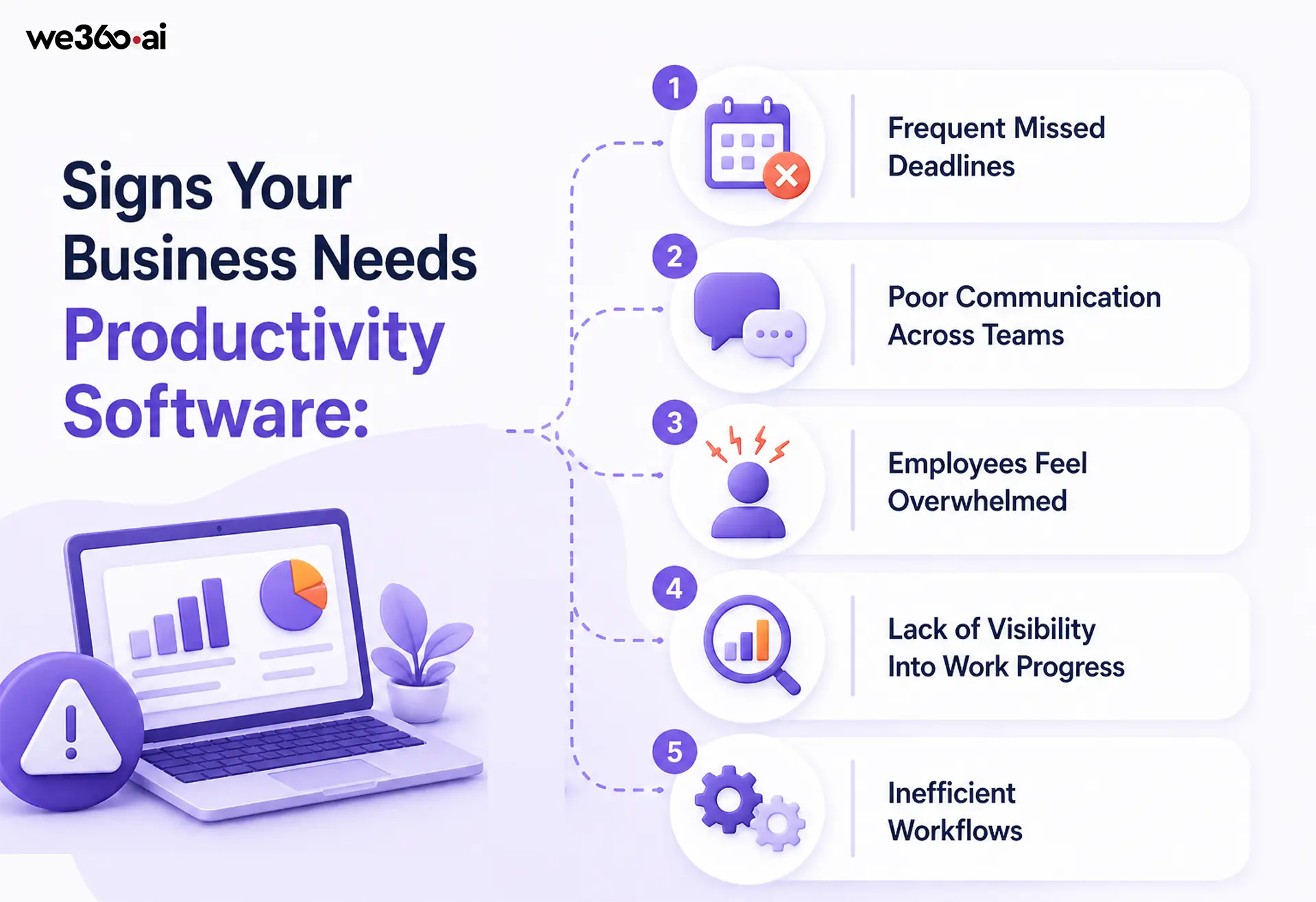
Does your organization need productivity software? These signs indicate it's definitely time to invest.
Frequent Missed Deadlines
When projects regularly miss deadlines, a project management tool providing visibility and accountability can help. Missed deadlines often indicate that status isn't clear, dependencies aren't tracked, or priorities aren't aligned.
A project management tool won't fix underlying capacity issues, but it will make them visible so you can address them.
Poor Communication Across Teams
When information gets stuck in email, decisions are slow, and people are unaware of what other teams are doing, communication tools help. Slack or Teams replaces inefficient email communication with organized channels and instant visibility.
Poor cross-team communication is often a tool problem, not a people problem.
Employees Feel Overwhelmed
When employees report feeling overwhelmed, it's often because work is disorganized and priorities are unclear. Project management tools providing clarity about what matters most help tremendously. Time tracking tools help employees understand where their time is going.
Overwhelm is often a visibility problem that productivity tools can solve.
Lack of Visibility Into Work Progress
When leaders don't know project status without asking, when surprises emerge late, or when bottlenecks aren't visible until they're critical, visibility tools help. Project management and analytics tools provide real-time status without constant status meetings.
Lack of visibility is often a tool problem, not a people problem.
Inefficient Workflows
When the same tasks are done manually repeatedly, when data is entered multiple times, or when information moves slowly through processes, automation helps. Workflow automation eliminates manual steps and accelerates work.
Inefficient workflows are prime candidates for improvements in productivity software.
How Productivity Software Optimizes Your Business: The Transformation Path
Understanding benefits is important. Understanding how the transformation happens is more useful.
Streamlines Workflows
Productivity software examines work processes and makes them more efficient.
Workflow streamlining includes:
- Eliminating unnecessary steps. Does every project need fifteen approval steps? Probably not.
- Automating repetitive tasks. Does someone need to enter data that could be automated manually? No.
- Parallelizing dependent work. Can tasks happen in parallel instead of in sequence?
- Removing communication gaps. Can information flow automatically instead of being manually transferred?
- Consolidating tools. Can three tools do what twelve tools currently do?
- Organizations that systematically streamline workflows using productivity software reduce process cycle time by 30 to 45 percent.
Improves Time Management
Visibility into how time is spent enables better time management.
Time management improvements include:
- Understanding where time actually goes, not where you think it goes.
- Identifying where time is wasted so you can reduce it.
- Protecting focus time for deep work instead of constant interruptions.
- Batching similar work together reduces context switching.
- Balancing workload across team members, preventing overload on some while others are underutilized.
- Time tracking software like Clockify or RescueTime,e combined with a project management tool,s creates insight into time allocation.
Enhances Decision-Making with Data
Instead of relying on intuition, productivity software provides data for better decisions.
Data-driven decision improvements include:
- Understanding project status based on data, not reports.
- Seeing trends over time to spot problems early.
- Comparing actual versus planned to understand performance.
- Understanding the capacity to make realistic resource allocation decisions.
- Seeing bottlenecks preventing progress so you can address root causes.
- The analytics and reporting capabilities of modern productivity software enable fact-based decision-making.
Aligns Teams with Business Goals
When everyone understands priorities and how their work contributes to business goals, alignment improves.
Alignment improvements include:
- Translating business goals into specific team and individual objectives.
- Making visible how individual work connects to organizational goals.
- Providing transparency so everyone knows what others are working on.
- Enabling quick reprioritization when business goals shift.
- Creating accountability for goal achievement.
- Project management tools showing business goals cascading through teams improve alignment significantly.
Reduces Operational Inefficiencies
Across an organization, inefficiencies compound. Productivity software identifies and eliminates them.
Inefficiency reduction includes:
- Eliminating duplicate work across teams that goes unnoticed.
- Removing approval bottlenecks where work sits waiting for decisions.
- Stopping over-communication and reducing unnecessary meetings.
- Preventing over-planning that delays actual work.
- Eliminating tools not actually being used.
- Organizations that systematically reduce operational inefficiencies see a 20-35% cost reduction.
How to Choose the Right Productivity Software: A Selection Framework
With thousands of productivity applications available, how do you choose? This framework guides selection.

Step 1: Identify Business Needs
Start by understanding what you're trying to solve.
Needs assessment includes:
- What problems are you experiencing? (Missed deadlines, poor communication, inefficiency)
- What outcomes do you want to achieve? (Faster projects, better collaboration, lower costs)
- What processes need improvement? (Project management, communication, time tracking, reporting)
- What's your current technology landscape? (What tools already exist?)
- Who will use the tool? (Everyone? Specific departments? Different user types?)
Document needs to be specific. "Improve efficiency" is too vague. "Reduce time spent on manual status updates by 80 percent" is specific and measurable.
Step 2: Evaluate Features
Once you know your needs, evaluate which productivity tools are best suited to them and whether they address those needs.
Feature evaluation includes:
- Does it solve the specific problem you're trying to address?
- Does it include the capabilities you need? (Reporting, automation, collaboration, etc.)
- Is it powerful enough to scale with your organization?
- Can it integrate with tools you already use?
- Are the user interface and required learning reasonable?
Compare multiple tools against your specific feature requirements. Don't choose based on popularity or nice-to-have features.
Step 3: Check Integrations
No tool works in isolation. Evaluate how well candidates integrate with your existing ecosystem.
Integration evaluation includes:
- Does it integrate with your communication platform (E.g., Slack or Teams)?
- Does it work with your file storage (Google Drive, OneDrive)?
- Does it connect to your calendar and email?
- Are there APIs for custom integrations if needed?
- Can it integrate with the specialized tools you use?
Tools that integrate well create connected ecosystems. Tools that don't create additional manual work.
Step 4: Consider Budget and ROI
Productivity software is an investment. Evaluate both costs and expected returns.
Budget and ROI evaluation includes:
- What's the cost per user? Does it scale with your organization?
- What's the total cost of ownership, including implementation and training?
- What's the expected return? How much time will be saved? How much cost will be reduced?
- What's the payback period? How long until ROI is achieved?
- Are there contract terms and cancellation costs?
For business productivity software, payback periods are typically 3 to 6 months if implementation is done well.
Step 5: Test Before Implementation
Never implement across your organization without testing first.
Testing approach includes:
- Pilot with a small team or department.
- Run parallel systems during the transition to catch issues.
- Gather feedback from actual users, not just administrators.
- Measure metrics before and after to validate impact.
- Train thoroughly during the pilot phase.
- Iterate based on pilot learnings before full rollout.
Most implementation failures happen because organizations skip this step and roll out to everyone at once.
Conclusion: The Efficiency Advantage Is Available Today
The organizations pulling ahead in 2026 aren't working harder. They're working smarter. They've invested in the right productivity software, implemented it well, and reaped the benefits.
The efficiency gap between organizations that use best-in-class productivity software and those that use outdated approaches is widening. Organizations with mature tool stacks report 30 to 40 percent higher productivity, significantly lower costs, better employee engagement, and faster execution.
The opportunity to close the gap in your organization is available today. The investment is modest compared to the returns. The implementation is straightforward if you follow this framework.
Start with an honest assessment of your needs. Identify the highest-impact problems to solve first. Choose tools that specifically address those problems. Implement methodically with proper testing and training. Measure results to validate the investment.
Within six months, your organization will be operating at a different level of efficiency. Your employees will be less frustrated and more productive. Your customers will experience faster delivery. Your financial results will reflect the investment.
The question isn't whether you can afford to implement productivity software. The question is whether you can afford not to.