

Remote work has moved from a temporary solution to a permanent business strategy—but supporting remote employees effectively is where most organizations struggle. The challenge isn’t just enabling people to work from home; it’s doing so without sacrificing productivity, engagement, or well-being. When support systems are weak, remote teams can quickly face communication gaps, burnout, and declining performance.
It’s all about striking the right balance—creating an environment where remote employees feel supported, connected, and motivated while still driving business outcomes. From understanding key challenges to implementing proven best practices and tools, in this blog, you’ll learn how to build a remote work culture that fuels productivity instead of hindering it.
Why Supporting Remote Employees Is a Business Priority
Supporting remote employees is a key business priority because it reduces costs, enhances productivity, and gives access to a global talent pool. Investing in hiring a remote talent pool leads to the following:
Remote work improves retention and hiring
When you roll out a remote work setting, it reduces turnover and boosts employee retention. This is a cornerstone because acquiring new employees to replace outgoing staff is expensive, requiring training and time to take on the departing employees’ work. Retention gives employees the flexibility to work from home and continue working where they otherwise might have been forced to stop.
Poor support leads to disengagement and productivity loss
When remote employee support is poor due to insufficient tools, training, or check-ins, it can leave employees feeling undervalued and disconnected, amplifying loneliness. It exacerbates stress, sadness, and emotional strain. They feel distant from the company's goals, resulting in mission alignment dropping to as low as 28%.
Employee experience directly impacts performance
Strong remote support via tools, feedback, and virtual connections boosts performance and flexibility by reducing distractions. Studies show up to 13% performance gains and 60% onboarding gains, with positive impacts on remote employees. Employees report higher engagement, satisfaction, and work-life balance, resulting in a 25% reduction in turnover.
Common Challenges Remote Employees Face
While remote work is proliferating today, there are a bunch of challenges, like:
Lack of visibility and recognition
Remote employees lack visibility. Gone are the days when employee performance was visible in real time. This makes them feel, “Is my work getting noticed?” When in-office employees perform exceptionally well, it is seen sooner. With a remote setup, spontaneous bursts of praise become rarer. Every day's contributions go unseen, limiting praise to major milestones. This leads to overlooked achievements, lower morale, and feelings of invisibility, with 27% reporting missed promotions.
Communication gaps
The remote workforce relies heavily on communication tools such as Zoom, Slack, and Microsoft Teams. They also record work done on Asana or Trello to keep employees on top of deadlines. However, direct communication is restricted. Employees need regular check-ins via virtual meetings and open feedback channels to ensure everyone stays on the same page.
Work-life imbalance
Working from home erases boundaries. There is a need for constant availability, overwork, and burnout from family interruptions and endless emails. Employees check messages 40% more often without clear short breaks. This leads to overwork, and employees feel little control over their personal lives.
It may seem like a little concern to you, but your employees feel they must be constantly available because their homes and offices are interconnected. This leads to a rapid decline in employee morale.
Isolation and low engagement
Isolation and decline in mental health profoundly impact employee morale. Many employees may feel it’s an escape from micromanagement and office gossip, but the counterpart is true. Remote work can be isolating, leading to depression, anxiety, and loneliness. Although an in-office setting can be tiresome at times, it offers social engagement, which can be beneficial for employees.
Limited career growth
A survey of 1500 business decision-makers states that almost 65% of employers do not trust remote workers to do their jobs from home. The survey also reports that 39% of employers do not feel employees work as hard as they do in an in-office setting when working remotely.
Thus, the remote employees are more prone to layoffs and less likely to receive raises without structured development.
11 Best Practices to Support Remote Employees Upskill
Here are some tips on how you can support remote employees in upskilling their performance while maintaining work-life balance:
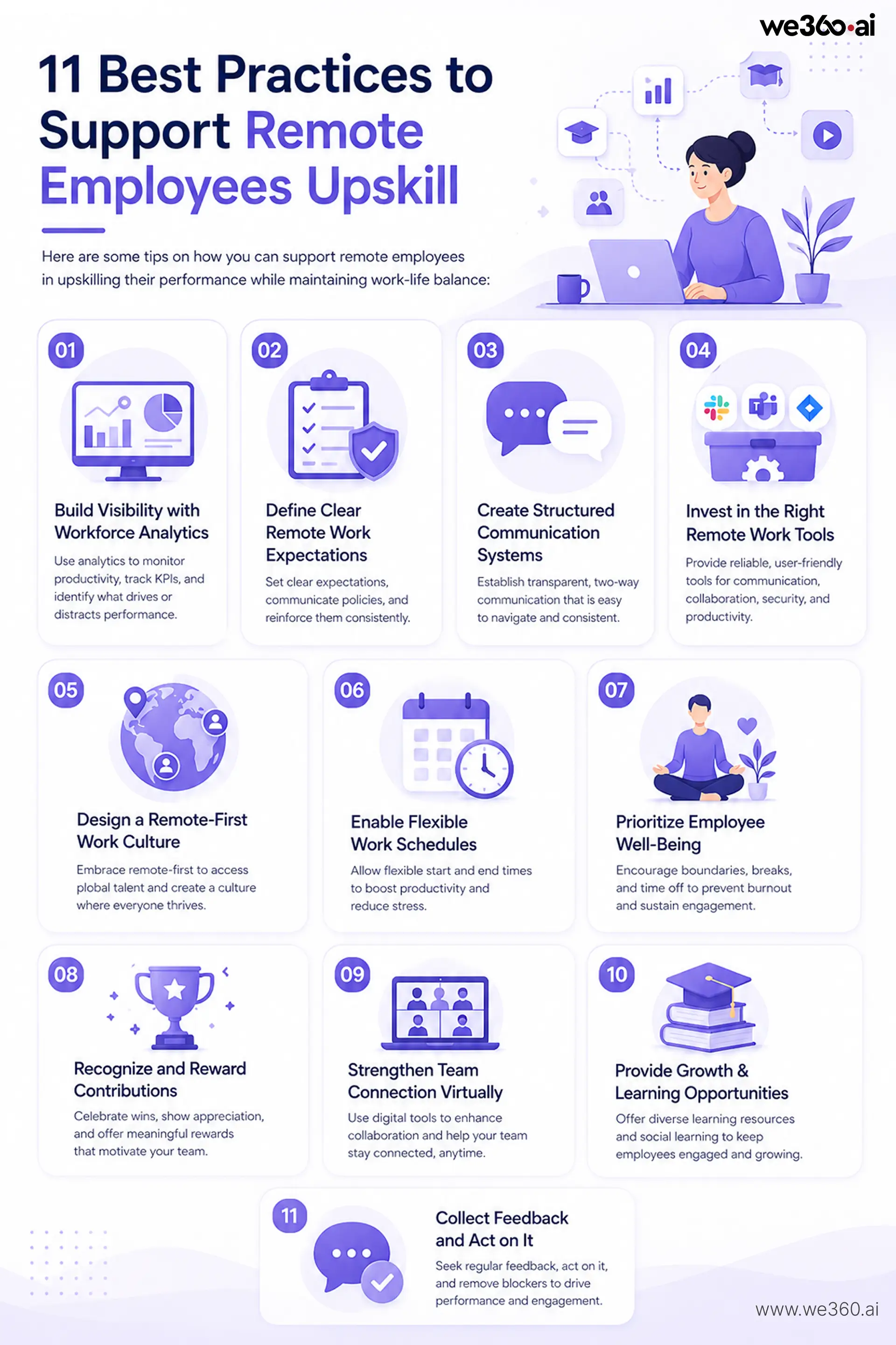
- Build Visibility with Workforce Analytics
When employees are not seen at their desks, they are deemed unproductive. You can leverage workforce analytics tools to monitor remote employees. This helps see how productivity is measured across KPIs. You can understand which tool or website increases productivity and which distracts from work.
- Define Clear Remote Work Expectations
As a manager, you need to outline expectations and convey them clearly to your remote employees. The employees must be warned about shadow IT and told what actions will be taken if a policy is violated. Due to the disconnection caused by remote work, this needs to be reinforced effectively and clearly.
- Create Structured Communication Systems
When employees work from home, there is a gap in their on-site presence. As per the survey, 47% of employees stated that effective communication is pivotal to transitioning to a remote work setting. The report identifies that the most significant communication has a few characteristics: it is transparent, a two-way dialogue, easy to navigate, and consistent. These policies are important when the team operates distantly or at scale.
- Invest in the Right Remote Work Tools
The technology industry has the highest share of remote employees, estimated at 67.75% of the global tech industry. However, the biggest concern in this setting is effective collaboration and the use of the right tool for communication.
You must invest in reliable and user-friendly tools to operate effectively and stay in touch. Use Slack or Microsoft Teams for communication, or use JIRA for project management. You can also provide reliable tech for collaboration, security, and productivity, such as VPNs and ergonomic stipends.
- Design a Remote-First Work Culture
With a remote-first culture, you have access to a global talent pool; for example, you can hire a developer from Scotland or a graphic designer from New York. As 91% of employees worldwide prefer to work remotely either full-time or in a hybrid setting. Your employees need to commute less and spend more time at home, which is a great benefit.
- Enable Flexible Work Schedules
Flexible scheduling is transforming remote work by providing control over work hours, thus improving productivity and reducing stress. Employees can choose the start time and end time. Their productivity is tracked via workforce analytics tools rather than rigid work times that aren’t productive.
- Prioritize Employee Well-Being
A remote work setting makes it difficult for employees to demarcate their work and personal lives. You can encourage your employees to set boundaries. One way to achieve this is to set clear hours and breaks. Assisting your employees in taking regular breaks and using vacation time outside office hours can prevent burnout and stress. This sustains engagement amid home distractions.
- Recognize and Reward Contributions
You must know your team well. One reward, like a ticket to football, may not be entertained by baseball enthusiasts. Thus, engage regularly with your team. Send them a care package, offer virtual team praises, and also share team recognition videos for employees to post on LinkedIn. You can also use appreciation walls where peers can share with team members. Host team-building activities, such as coffee chats or ERGs, to replicate office camaraderie.
- Strengthen Team Connection Virtually
If your team is dispersed globally, you need to invest in digital tools mindfully. Communication and project management tools must enhance virtual collaboration. You can use file-sharing tools like Google Drive or SharePoint, which are inexpensive to implement.
Your team can also better understand each other through communication tools. Also, employees feel empowered to connect anytime, irrespective of their global presence.
- Provide Growth & Learning Opportunities
Learning doesn’t happen in silos but in social settings. Its benefits include:
- Helping remote employees stay engaged.
- Enhancing retention by allowing employees to interact with each other.
- Fostering an environment of collaboration.
- Using a variety of content to learn, such as videos, podcasts, games, images, and virtual activities.
- Collect Feedback and Act on It
You must make time for feedback. Set up regular one-on-one meetings via phone or video conferencing. 43% of highly engaged employees receive feedback at least once a week. This helps touch base, follow up on goals, and identify any blockers to employees’ performance or engagement.
Tools That Help Support Remote Employees
- Workforce analytics: ActivTrak, We360.ai
Workforce analytics tools like ActivTrak and we360.ai provide insight into productivity patterns, focus time, and workflows without invasive tracking. These tools build visibility, helping managers recognize efforts and address bottlenecks transparently.
- Communication: Slack, Microsoft Teams
Slack excels at real-time messaging, channels, and integrations for quick updates, helping eliminate silos. Microsoft Teams adds video, file sharing, and calendars, fostering structured async and sync interactions to bridge time zones.
- Project management: Asana, ClickUp
Asana offers lists, timelines, and dependencies for clear goal alignment and progress tracking. ClickUp combines tasks, docs, and whiteboards, enabling flexible workflows that combat disorganization in remote setups.
- Collaboration: Google Workspace
Google Workspace integrates Docs, Sheets, Drive, and Meet for seamless real-time editing and sharing. It supports remote teams by providing version history and comments, addressing document access issues.
Related read: Track Tools Your Team Uses with Smart Software Usage Tracking
Key Mistakes Companies Must Avoid
Although you take all steps for a fair setup, there are some mistakes to avoid meticulously:
Micromanaging employees
Remote work can promote micromanagement in the workplace, intended to track employees’ productivity. While it’s pivotal to stay in touch with employees, it must not cross certain boundaries by meddling in employees’ personal space.
There are several aspects of working from home. 77% of employees say they are more productive when working from home. 76% avoid the office when they need to focus on a project. This means you must not poke the employees now and then, interrupting their workflow.
Ignoring employee well-being
Remote work has a con—it blurs the line between work and personal space. This can be counteracted by setting aside dedicated time for work and leisure. When employees need to take a break or leave work for the day, they can simply log off and shift out of the work mindset.
Overloading with meetings
When employees work from home, the way to connect with them is through meetings, email, or communication tools like Slack and Microsoft Teams.
Meetings need a head with energy and passion, since not every meeting is called for. But some meetings are crucial. They help teams coordinate and gather feedback and advice from their peers. These meetings should always have a clear purpose; holding one just to meet is a waste of time and can make employees dread the next one.
Lack of clear policies
When policies are unclear, they lead to confusion, uneven accountability, and the erosion of trust. This implies challenges like communication gaps and work-life imbalance. In such cases, managers over-monitor or disengage, while employees feel unvalued due to poor visibility into standards.
Unclear data-handling or device policies expose breaches; no standards for approved tools invite vulnerabilities.
Not acting on feedback
When employees see their feedback unseen or unheard, they become confused and lose trust in the organization. There is a decline in morale and engagement as employees feel unsupported. A decline in morale also leads to a loss of productivity and efficiency. Demotivated employees are less focused and less likely to go the extra mile.
Action Plan for Leaders
Here are some steps you can take:
Audit the current remote work setup
As the current remote workspace expands, it is crucial to audit how remote teams are performing. In this audit, you can evaluate your remote work infrastructure, policies, communication strategies, technology, and employee well-being. You can assess these to enhance your remote work environment, identifying gaps and addressing bottlenecks.
This is pivotal as miscommunication, lack of engagement, and data security risks often arise in remote settings. A remote work audit helps counteract these issues to optimize and sustain a remote work model.
Identify gaps in tools and processes
When your team operates remotely, you may encounter fragmented systems that leave the entire setup scattered. There are multiple storage locations and versions. For instance, employees work on outdated versions or documents, depleting efficiency and wasting efforts.
With workforce analytics tools, you can identify weak points, assess user experience, use integrated platforms, and reduce redundancy. With clear protocols, invest in targeted collaboration tools and foster continued learning.
Implement structured communication
One of the crucial factors of why remote teams are successful is using a strategy for when and how to communicate. This helps block time for deep work and set aside time for effective communication. Thus, asynchronous communication is a default for a remote team. They delve into meetings only for the most complex group solving.
Monitor performance with data
77% of employees say they'd be less concerned about monitoring if employers were transparent about it. When you follow a non-invasive approach, you can still get insights into productivity, attendance, and active time without screenshots, keystroke logging, and screen recording. This data helps you take strategic steps and remain compliant with legal and regulatory requirements such as GDPR, HIPAA, PCI DSS, and more.
Continuously optimize
You can optimize your remote work setup by:
- Collecting data and feedback
- Analyzing the data
- Prioritizing changes
- Developing an action plan
- Communicating changes
- Implementing changes
- Collecting feedback and data again
If you are not sure about employee feedback questions, use these tailored questions:
- What remote work challenges do you face most?
- Which tools or tech could enhance your remote setup?
- Do you have enough resources and support for effective remote work?
- Where has remote work affected your productivity?
Conclusion
Now that we know how to support remote employees without hurting productivity, it isn’t about tighter control; it’s about smarter systems. Organizations that succeed focus on clarity, trust, and the right mix of technology and human connection. By addressing common challenges, avoiding micromanagement, and investing in tools, communication, and employee well-being, you create a workplace where remote teams can truly thrive.
The key is to treat remote work as an evolving strategy, not a one-time setup. Continuously gather feedback, refine processes, and adapt to changing needs. When done right, supporting remote employees doesn’t just maintain productivity; it amplifies it, helping your business stay agile, competitive, and future-ready.
If you need a workforce analytics tool that fosters an environment of productivity in a remote setting, book a FREE DEMO with we360.ai today!
.png)