




Summarize With AI


Most people don’t think twice about what’s happening behind their screens at work. You log in, open your tools, reply to messages, and move through your day, assuming it’s business as usual. But in many modern workplaces, there’s more happening in the background than employees realize.
Employee monitoring has quietly become a standard practice across industries. Companies use it to track productivity, protect sensitive data, and understand how work gets done. In theory, it sounds reasonable. In reality, it often operates so subtly that most employees never notice it at all.
That’s where the uncertainty creeps in- AM I BEING WATCHED?
Maybe your computer feels slower than usual. Maybe certain websites suddenly stop working. Or you get a sense that your activity is being watched more closely than before, but you can’t quite prove it. These small signals are easy to ignore, yet they can point to something bigger.
This article breaks down 10 often-overlooked signs that you might be monitored at work. Not the obvious ones, but the subtle cues most employees miss. By the end, you’ll have a clearer picture of what’s normal, what’s not, and how to approach the situation with awareness instead of guesswork.
What Is Employee Monitoring Software?
Employee monitoring software is a set of digital tools companies use to track, measure, and understand how work is being done during office hours. It runs quietly in the background, collecting data on activities like app usage, time spent on tasks, and overall system behavior.
At its core, it’s not always about “watching” employees in the way people fear. It’s more about visibility.
For example, a company might want to know:
- How much time is spent on productive tools versus distractions
- Whether projects are progressing on schedule
- If the company data is being accessed or shared securely
To do this, monitoring software can track things like:
- Active and idle time on your computer
- Websites and applications you use
- Login and logout times
- Task or project activity
- In some cases, screenshots or screen recordings
Some tools go even further by analyzing patterns. They can show productivity trends, highlight inefficiencies, and help managers make decisions based on actual data rather than assumptions.
However, the experience can feel very different from the employee’s side.
When monitoring is transparent, it feels like a performance tool. You know what’s being tracked, why it’s being tracked, and how it benefits you. But when it’s unclear or poorly communicated, it can feel like silent surveillance, which leads to confusion, stress, and mistrust.
That’s why understanding how these tools work is important. Once you know what employee monitoring software actually does, it becomes much easier to recognize the signs that it might already be in place.
10 Signs You Are Being Monitored at Work
Most companies won’t openly announce every detail of how they track employee activity. Instead, the signs tend to show up in small, everyday changes. Easy to overlook, but noticeable once you know what to watch for.
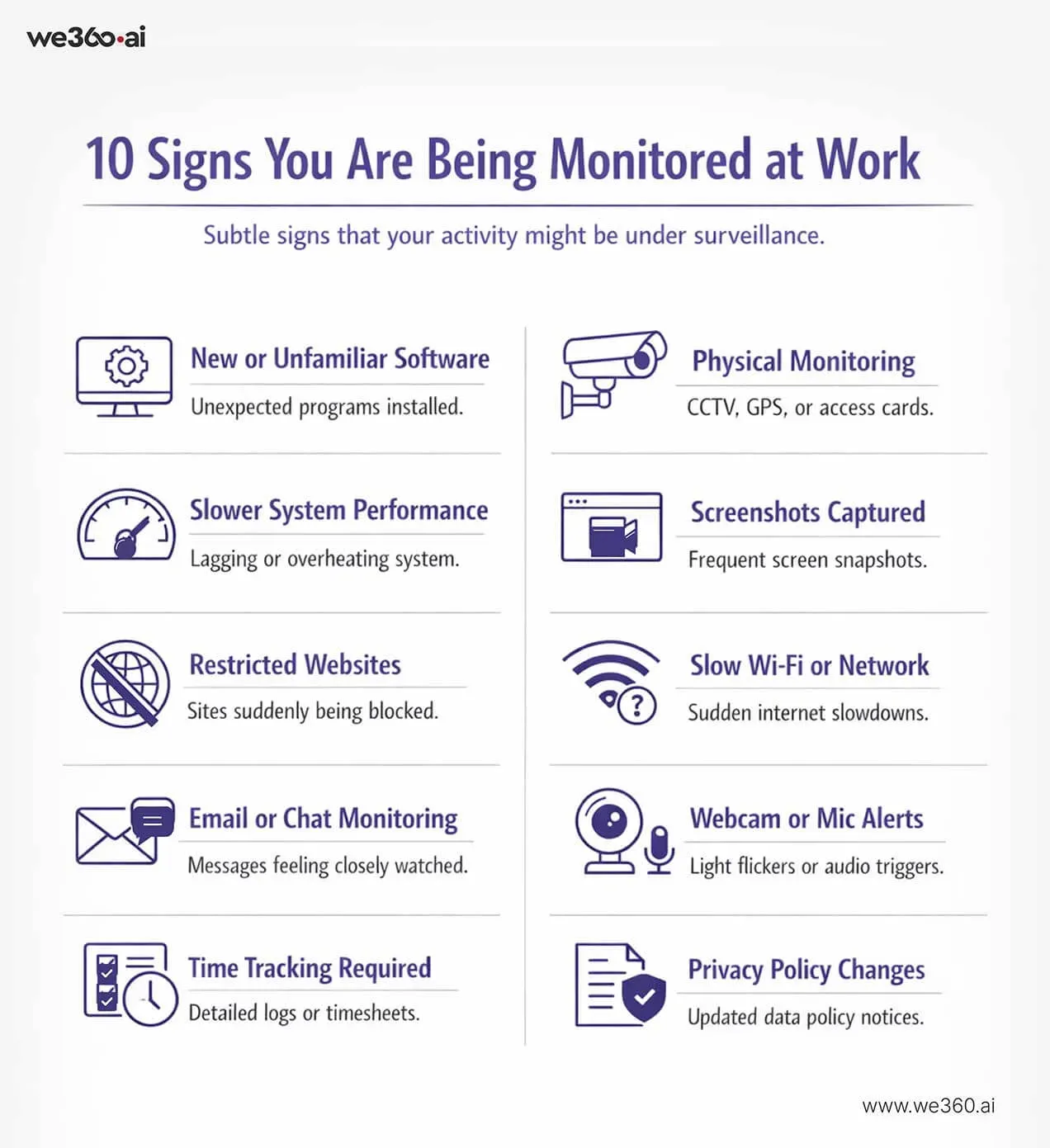
Here are 10 subtle signals that your workplace might be monitoring your activity.
1. New or Unfamiliar Software Installed
If you notice programs on your system that you don’t remember installing, that’s worth paying attention to. Monitoring tools often run quietly in the background with generic or unfamiliar names. They may not be obvious unless you check your installed applications or task manager.
2. Slower System or Unusual Computer Behavior
A sudden drop in performance can sometimes be more than just an aging system. Monitoring software runs continuously, which can affect speed. You might notice lag, delayed responses, or your system heating up more than usual without a clear reason.
3. Restricted Websites or Network Access
If certain websites suddenly become inaccessible, especially ones that were previously allowed, it could be due to network-level monitoring. Companies often block platforms they consider distracting or risky, and these restrictions are usually part of a broader tracking system.
4. Email or Chat Activity Feels Different
Ever feel like your messages are being watched more closely? Some companies use tools that scan emails or chats for keywords, tone, or sensitive information. You might notice quicker responses from management or subtle references to conversations you didn’t directly share.
5. Time Tracking or Activity Logs Are Required
If you’re asked to log your hours more precisely or account for your time in detail, it’s a strong indicator of monitoring. This could be through manual timesheets or automated tools that track active work time and idle periods.
6. Physical Monitoring (CCTV, GPS, Access Cards)
Monitoring isn’t just digital. Offices often use CCTV cameras, access cards key card door lock, or even GPS tracking for field employees. If your movements in and out of the office or specific areas are being recorded, that’s part of the bigger monitoring system.
7. Repeated Screenshots or Screen Captures
Some monitoring tools take periodic screenshots of your screen without interrupting your workflow. If you’ve ever come across saved images of your desktop activity or noticed brief flickers, it could be a sign that screenshots are being captured.
8. Wi-Fi or Ethernet Speed Changes
Network-based monitoring can sometimes affect internet speed. If your connection feels inconsistent, especially during certain activities, it might be due to filtering, tracking, or bandwidth prioritization set by your company.
9. Webcam Light Flickering or Audio Triggers
This one gets people’s attention quickly. While rare and usually controlled, some monitoring tools can access hardware like webcams or microphones. If you notice unexplained light activity or audio triggers, it’s worth investigating further.
10. Change of Privacy Policies
Sometimes the biggest clue is right in front of you. If your company updates its IT or privacy policies, especially with new clauses around data tracking or device usage, it often signals the introduction or expansion of monitoring systems.
Why Companies Monitor Employees
Before assuming the worst, it’s important to understand one thing clearly. Most companies don’t implement monitoring just to “watch” employees. There are practical reasons behind it, especially in today’s digital and remote work environments.
That said, the intent and execution can make all the difference.
Productivity Insights
Managers can’t physically see how work is progressing, especially in remote or hybrid setups. Monitoring tools help fill that gap by showing how time is spent during work hours. This helps identify what’s working, what’s slowing teams down, and where support might be needed.
For example, if a team is spending too much time switching between apps, it may point to workflow inefficiencies rather than poor performance.
Workflow Optimization
Good monitoring data can reveal patterns that are otherwise hard to spot. Maybe a process takes longer than expected. Maybe certain tasks consistently create bottlenecks. With the right insights, companies can streamline operations and remove unnecessary friction.
In this sense, monitoring becomes less about control and more about improving how work gets done.
Data Security
This is one of the biggest drivers. Companies handle sensitive information, client data, financial records, and internal documents. Monitoring helps prevent data leaks, unauthorized access, or risky behavior, such as downloading files to personal devices.
It’s not just about employees. It’s about protecting the business as a whole.
Compliance Requirements
In some industries, monitoring isn’t optional. It’s required. Sectors like finance, healthcare, and IT often have strict regulations around data handling and communication. Companies use monitoring tools to stay compliant and avoid legal risks.
The Problem: When Monitoring Feels Like Surveillance
There’s a fine line between tracking work and watching people. When companies cross that line, even unintentionally, monitoring stops feeling helpful and starts feeling uncomfortable.
The issue isn’t always the tool itself. It’s how it’s used and how much employees know about it.
Micromanagement
When every click, pause, or minute is tracked too closely, it creates pressure. Employees may feel like they’re being judged constantly, even for normal breaks or thinking time. Instead of focusing on meaningful work, they start focusing on “looking busy.”
Over time, this hurts productivity rather than improving it.
Lack of Transparency
One of the biggest triggers of discomfort is not knowing. If employees aren’t clearly told what’s being tracked, how it’s used, or why it’s in place, trust starts to break down.
People naturally assume the worst when there’s a lack of clarity. Even simple tracking can feel invasive if it’s hidden or poorly explained.
Stress and Anxiety
When employees feel constantly watched, it changes how they behave. They may avoid taking short breaks, hesitate before switching tasks, or overthink small actions.
This constant self-awareness builds stress. And stressed employees don’t do their best work.
Privacy Concerns
Work devices are one thing. But when monitoring blurs into personal space, such as tracking beyond work hours or accessing private data, it raises serious concerns.
Employees want to feel respected, not controlled. Once that boundary is crossed, it becomes difficult to rebuild confidence in the workplace.
Monitoring isn’t the problem on its own. Poor implementation is.
When companies focus solely on control rather than trust, the entire purpose of monitoring is lost. What should be a productivity tool turns into a source of tension, and that’s where both employees and employers lose.
Micromanagement vs Transparency
Not all employee monitoring feels the same. In some workplaces, it runs quietly in the background and actually helps people stay focused. In others, it feels like constant pressure. The difference usually comes down to one thing: how it’s communicated and used.
What Micromanagement Looks Like
Micromanagement happens when monitoring is used to control every small detail of how work gets done.
You might see things like:
- Constant check-ins about minor tasks
- Questions about short periods of inactivity
- Pressure to stay “active” every minute of the day
- Judging performance based on screen time instead of results
In this environment, employees often feel like they’re being watched rather than trusted. The focus shifts from doing meaningful work to simply proving you’re working.
What Transparency Looks Like
Transparency changes the entire experience.
Instead of hiding monitoring tools, companies openly explain:
- What is being tracked
- Why is it being tracked
- How the data will be used
Employees are given clarity and, in many cases, access to their own data. This makes monitoring feel less like surveillance and more like a shared system for improving performance.
For example, if you can see your own productivity trends, you’re more likely to use that data to manage your time better. It becomes a tool for self-improvement, not just evaluation.
The Real Difference
Micromanagement focuses on control.
Transparency focuses on clarity and trust.
The tools might be the same, but the impact is completely different.
When employees understand the purpose behind monitoring and feel included in the process, they’re far more likely to accept it. Without that understanding, even the simplest tracking can feel intrusive.
That’s why the conversation around monitoring matters just as much as the technology itself.
Related read: How Employee Productivity Software Helps Managers Make Better
How We360.ai Solves Employee Monitoring Challenges
The real issue with employee monitoring isn’t the concept. It’s how it’s implemented. When done right, it can create clarity, improve performance, and reduce unnecessary pressure.
That’s where tools like we360.ai take a different approach.
Instead of focusing on surveillance, it focuses on visibility and balance. The goal is to help both employers and employees work smarter, without creating a culture of constant oversight.
For Employers
- Data-driven performance insights: Rather than relying on assumptions, managers get clear data on how work is progressing. This makes it easier to identify high performers, spot bottlenecks, and make informed decisions.
- Better workload distribution: When you can see who is overloaded and who has capacity, it becomes easier to assign tasks fairly. This prevents burnout and ensures work is distributed more effectively across the team.
- Improved team efficiency: With insights into app usage, time allocation, and workflow patterns, companies can streamline processes. Small inefficiencies can be identified and fixed before they become bigger problems.
For Employees
- Clear expectations: Employees know exactly what is expected of them. There’s less guesswork and fewer misunderstandings about performance.
- Self-performance tracking: Instead of being evaluated only by managers, employees can see their own productivity data. This helps them improve their work habits and manage time more effectively.
- Reduced micromanagement: When performance is backed by data, managers don’t need to constantly check in. This creates a more relaxed and trust-based work environment.
Sign Up for Productivity
What to Do If You Think You're Being Monitored
If you’re starting to notice signs of monitoring, the worst thing you can do is panic or jump to conclusions. A calm, informed approach works better.
Here’s how to handle it.
- Check company policy: Start with the basics. Go through your company’s IT, privacy, or employee handbook. Most organizations outline what they track and why.
- Ask clear questions: If something feels unclear, ask about it. A simple conversation with HR or your manager can clear up a lot of confusion. Focus on understanding, not accusing.
- Understand the purpose: Try to see the bigger picture. Is the monitoring in place for productivity, security, or compliance? Knowing the reason helps you interpret it more rationally.
- Focus on outcomes, not fear: At the end of the day, most companies care about results. If you’re meeting expectations and delivering quality work, monitoring becomes far less of a concern.
Track, Monitor, and Optimize Workforce with HR Staffing Agency Software
Conclusion
Employee monitoring is no longer a rare practice. It’s becoming a standard part of modern workplaces, especially with remote and hybrid work on the rise.
The key difference lies in how it’s used.
When done transparently, it can improve productivity, create clarity, and even empower employees to perform better. But when it’s hidden or overly controlling, it leads to stress, mistrust, and disengagement.
If you’ve noticed signs that you might be monitored, don’t ignore them. At the same time, don’t assume the worst. Take the time to understand what’s happening, why it’s in place, and how it affects your role.
Awareness puts you in control. And in a monitored environment, that matters more than ever.
FAQs
1. How do I know if I'm being watched or monitored at work?
Look for patterns rather than a single sign. Things like unfamiliar software, stricter time tracking, restricted websites, or changes in system behavior can indicate that monitoring is in place. Checking company policies can give you a clearer answer.
2. How to detect if you are under surveillance?
You can review installed programs, monitor system performance, and observe network restrictions. However, the most reliable way is to check official company documentation or directly ask your employer.
3. What is an example of employee monitoring?
A common example is software that tracks active work time, applications used, and websites visited during working hours. Some tools also take periodic screenshots or generate productivity reports.
4. What is the best employee monitoring software?
The best software is one that balances productivity tracking with transparency. Tools like we360.ai focus on giving both employers and employees clear insights without creating a sense of constant surveillance.
Related Posts

Employee perks can be valuable for both employees and employers when planned thoughtfully. This guide explores how to choose benefits that employees actually value while keeping business goals and budgets in mind. Learn how the right perks can improve satisfaction, engagement, retention, productivity, and workplace culture without unnecessary spending.

Quiet quitting can be hard to spot until motivation and performance start slipping. This guide looks at common reasons employees disengage, signs managers should watch for, and practical ways to rebuild trust, improve communication, recognize good work, and create a workplace where employees feel supported, valued, and motivated to contribute.
The demand for Indian BPO is growing at 50% every year. With such a massive increase, this industry goes through huge internal and external turbulence to survive the cut-throat competition.
The modern workplace is experiencing a shift towards remote and hybrid work setups. There are many benefits to hybrid working. Apart from keeping people safe from the deadly virus, it also gives people flexibility and freedom . In addition, it helps organisations to save up on their capital infrastructure. However, the shift has a new set of challenges. One of those is the changing face of workplace productivity management & employee monitoring system. Ever since the organisation has switched to different modes of working the average workspace productivity has fallen by 60% .